Google Chromecast Ain’t All That (Nor A Bag Of Chips)

Received my Google Chromecast today, and in spite of the fact that I was tired, I had to try it out.

Followed the instructions: Plug into hdmi port on tv, plug in power, switch tv input to hdmi port (that device is connected to), follow on-screen instructions, and you’re up and running.

Yeah, pretty easy, but … I had to install the Google Chrome browser on my laptop, which I really didn’t want. Then I had to install a Chrome plugin, which is used to cast a browser tab to the device.

So, what are my gripes?

Well, you can broadcast your desktop to the tv (what I wanted the Chromecast for), but there is no sound. Sure, there are ways around that, but the problem is that that will not take the video delay (noticeable) into account. Also, that ability is experimental, so maybe it’ll get better, or maybe Google will do away with it. I don’t know. Yeah, but you can watch Hulu or Netflix with it. That’s not what I wanted to do. Sorry. Also, if you want to watch a movie that you recorded on a computer, say it’s recorded in wtv format (Windows Media), and you try to watch it in the Chrome browser (remember, you gotta do that or no sound), it’s going to try and download the file by default instead of playing it.

It’s reported that you can download Quicktime and allow the plugin on Chrome, and that this will allow it to play, but it didn’t work out of the box for me.

It’s not all bad, as I did get it to work pretty much the way I wanted. I converted a sample movie to mp4, ogg, and webm formats*, and then made a webpage to watch the video (on my local server).

Okay, I have to admit, that was kind of fun, but still, the average user is going to get stuck with Hulu or Netflix (which you can already get on DVD players and TV’s these days). So, I figure most users will just play with the Chromecast for a day or two and decide it’s not what they’d hoped for, nor what they wanted, and put it aside to collect dust (only because it’s too much like trouble trying to get their money back for it).

* We love ffmpeg!
Posted in Complaints, Computer Stuff | Tagged , , , , | Leave a comment

Trigger Block Logic Or Why I Learned To Love Outlines

As a child they tried to teach me many things that I resisted learning. How could this possibly be useful was my first question? That, and the fact that their rigid teaching methods didn’t consider learning a concept enough, caused me to relearn many things, on my own, after the fact. One of those things was the value of an outline. I won’t lie and say that I always make outlines, far be it from that, but sometimes it’s invaluable.

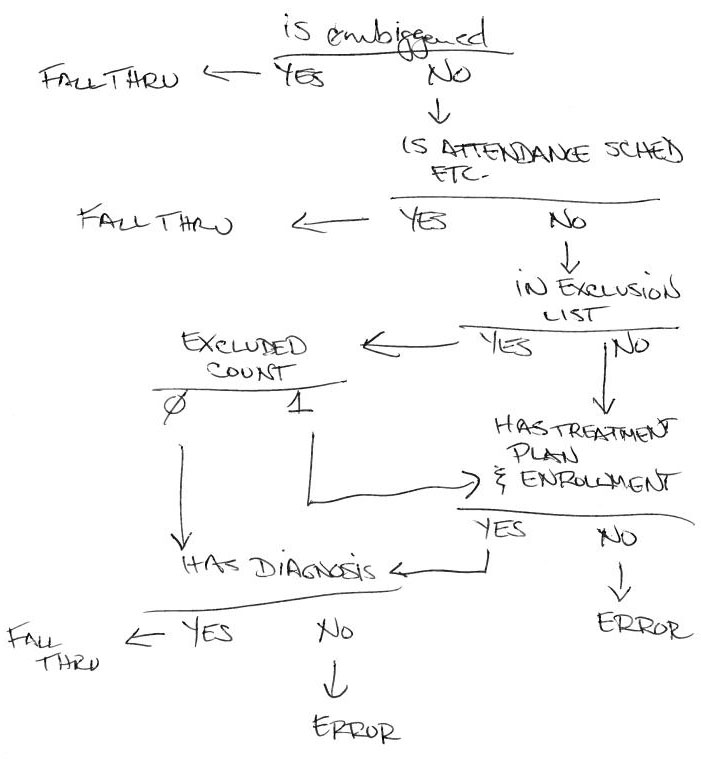
Take, as an example, something I worked on (fairly recently) at a previous job. The fact that the specifications of the request changed daily (sometimes several times a day), and something that started out as fairly simple grew to something not as simple, had little to do with the fact that I could not completely wrap my mind around some of the logic that was needed to produce a trigger (for MSSQL) that gave the desired outcome. Anyway, I soon realized that a block diagram (an outline of sorts) was needed. Hence the image:

Trigger Block Logic for SQL Trigger

Trigger Block Logic for SQL Trigger

With things broken down into logical blocks that I could see, as opposed to trying to keep everything in my mind, made programming the trigger so much easier. Not only that, but it had the side effect of making it easier to explain to others (the requestor, fellow devs, etc.) how it worked.

So, outlines are useful after all.

Image notes:

  • embiggened (an homage to The Simpsons) – a function for determining if a user is exempt
  • Two outcomes of the trigger were fall thru (pass through the trigger) and error (rollback the transaction and print an error message)
Posted in Computer Stuff, SQL, writing | Tagged , , , , | Leave a comment

Script Geek Talk

action = !understand ? ‘nothing’ : ‘like’;

Posted in Computer Stuff | Tagged | Leave a comment

Dates in Month-Day-Year Format

I’ve seen posts and heard comments about how illogical it is that we (Americans of U.S. variety) use month/day/year date format. How can it possibly be logical? It doesn’t go from largest, most significant to smallest, least significant–you’re most familiar with this if you dabble in databases and computers. Neither does it go from smallest to largest, days to months to years. Why then would anyone use it, or think it reasonable?

Well, think back to the not too distant past when clocks were candles or sundials. It really wasn’t all that long ago. Anyway, back in that era, crops and farm work were scheduled more around times of the year that coincided with moons or months. I’m not saying they didn’t know what day of the month it was, but moons, months were much more important then. I mean, think about it, what’s the difference between the 3rd day of January and the 16th day of January? Not much. What’s the difference between 1963 and 2003? Not much. What’s the difference between March and April? Now that can be a big difference (depending on where you live and the climate).

Just my thoughts. Never researched this, so for all I know this could be true.

Posted in My Opinion, Off Thoughts (Off as in Not Quite Right) | Tagged , | Leave a comment

EHR Experiences So Far

We began our descent into madness, the madness of EHR, around April of 2013. We were informed that the EHR system would go live on July 22, so all vacations would be cancelled. That was the first thing that turned me against the EHR system (as the cancellation of vacation was vocalized by one of the EHR staff – some called her Attila).

We received a crash course in navigation, use, and programming of the EHR. The programming bit was necessary as the dev team was going to have to customize the system to meet our company’s needs. The sad part is the programming training spent way too much time teaching us how to stylize the forms. Pretty much a waste of time, if you ask me, as their (EHR) forms all look like their head designer was a school child who had just learned cursive writing, but wasn’t confident using it. It was during this time of training that we heard things like, “That’s just awesome!” and “I’ve never seen that before.” These referring to the rock solid performance of this magnificent EHR machine. When asking how to fix these awesome issues, we were told to shut down the program and restart it. That became our official mantra during training and thereafter.

Blah, blah, blah, fast forward to a telephonic conference we had with the bigwigs of the EHR company the other day. Our billing manager had pieced together a list of issues with the system as it still was not billing properly. The main guy at the EHR company feigned ignorance, and wanted to know why someone had not told him about it/called him. Everyone assured us that, on the whole, all their customers were happy with their system, and that they have not received negative feedback. Seriously? I wonder where our negative feedback will be documented?

To be fair, I have researched EHR’s, and in general, not many people are really happy with their EHR. The consensus is all EHR’s suck. If you don’t believe me, google it. Oh, and in spite of its clunkiness, lack of data entry safeguards, etc., I’m not wholly at odds with the system. To explain, after a while a farmer grows used to the fragrance of the farm. However, a clinician once told me that using the EHR is like “trying to teach a schizophrenic off his meds to do two simple tasks.”

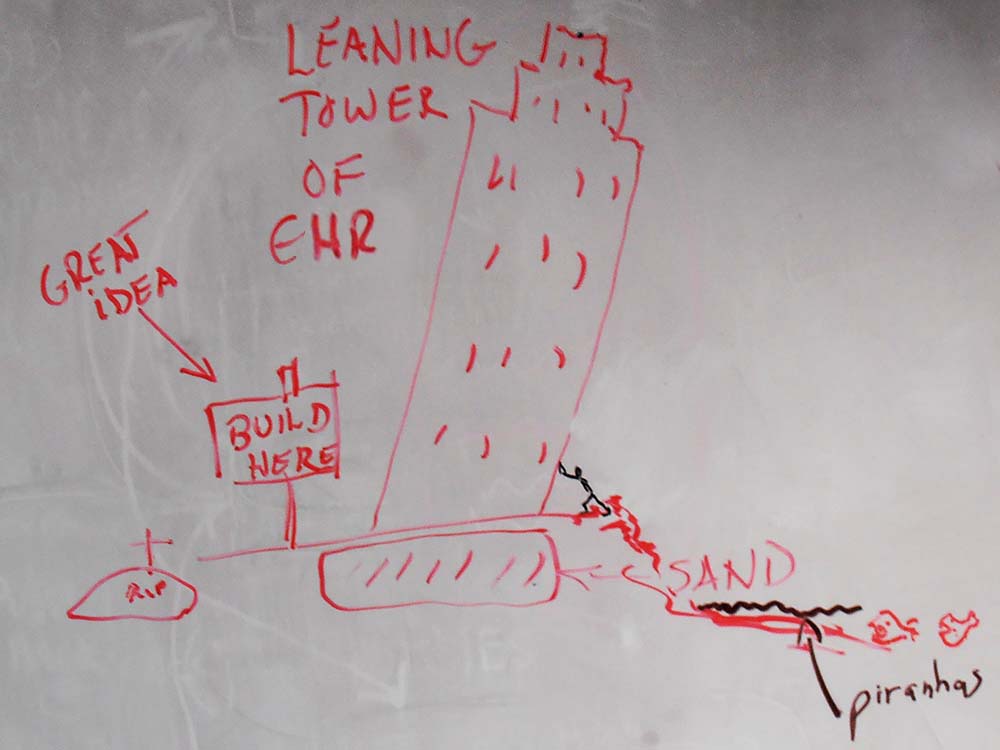
To illustrate some of our feelings about the EHR, below is a picture generated by some of the IT and QI folk.

Leaning Tower Of EHR

Leaning Tower Of EHR

Note: The image was photoshopped to protect the innocent. It has been modified ever so slightly to remove the EHR name (hint, begins with an ‘E’).

Anyway, I think the image pretty much speaks for itself, but will fill in the holes:

  • The burial mound showing RIP is to remind us of someone who recently left the company. We feel the EHR implementation had a lot to do with it.
  • The stick figure attempting to hold up the leaning tower represents the sole original dev member left to maintain the system.

Personally, I think there should be bodies falling from the tower, plummeting to their demise (see piranha) as this implementation, and subsequent use, has taken a lot of souls. Sometimes, though, enough is enough.

******************************************************

Addendum:

I was done with the story, but one of my workmates suggested I add the image below. It also shows how we feel about our EHR system. Nothing needs to be said about this one except maybe, “EHR on, Garth!”

EHR pig - she's real perty!

She’s real perty!

Posted in Complaints, Computer Stuff, My Opinion | Tagged , , , , , | Leave a comment

Spring Is Here (in New England)

dogwoods lining driveway

Dogwoods Lining Driveway

The grass is greening, the dandelions pepper the landscape, and the dogwoods are blooming. Spring is finally here!

Posted in My Opinion | Tagged , , , , | Leave a comment

Random Password Generator

One way to make a random password generator. See it in action: Random Password Generator Example

Hopefully I’ve commented enough in the code to explain it all:

<?php
/**
 * generateRandomPasswords.php
 * @author Robert Newton <lektrikpukeAtYahooDotCom>
 * if you use/reuse my code, please give a mention to my site/blog--Thanks!
 */

/** arrays where characters are stored
 * note:  special characters like & (ampersand) and # (pound) can cause display issues
 */
$capLetters = array('A', 'B', 'C', 'D', 'E', 'F', 'G', 'H', 'I', 'J', 'K', 'L'
    , 'M', 'N', 'O', 'P', 'Q', 'R', 'S', 'T', 'U', 'V', 'W', 'X', 'Y', 'Z');
$lowercase = array('a', 'b', 'c', 'd', 'e', 'f', 'g', 'h', 'i', 'j', 'k', 'l'
    , 'm', 'n', 'o', 'p', 'q', 'r', 's', 't', 'u', 'v', 'w', 'x', 'y', 'z');
$numbers = array('0', '1', '2', '3', '4', '5', '6', '7', '8', '9');
$specials = array('!', '@', '#', '$', '%', '^', '*', '+', '=', '_', '~', '{', '}');

// default counts of characters, overridden when correct values are entered into form
$lowerCount = 2;
$numCount = 3;
$capCount = 1;
$specialCount = 3;

// change this to change how many times the password is (re)shuffled and displayed
$shuffleCount = 4;

// don't change below
$password = '';
$eMess = '';

/**
 * genRandom
 * loops through passed in array $arr $cCount number of times picking characters
 * randomly and adding to return string $randchars
 * @param array $arr
 * @param int $cCount
 * @return string
 */
function genRandom($arr, $cCount) {
    $arrCount = count($arr) - 1; // counts chars in array--used to set upper limit of random
    $randchars = '';
    for ($i = 0; $i < $cCount; $i++) {
        $randchars .= $arr[mt_rand(0, $arrCount)];
    }
    return $randchars;
}

if (isset($_POST['submit'])) {
    try {
        foreach ($_POST as $key => $val) {
            if ($val !== 'Generate' && $val !== '') { // exclude submit button and empty values
                if (!is_numeric($val) || abs((int)$val) > 99) { // if it's not a number(int) or greater than 99, throw an error
                    throw new Exception('Value must be numeric: ' . $val);
                } else { // else assign value to variable (overriding default)
                    ${$key} = abs((int)$val); // negatives are not allowed
                }
            }
        }
    } catch (Exception $e) { // if an error occurred, catch it and add to error message
        $eMess .= $e->getMessage();
    }
}

// call function passing in array and number of characters wanted (to be generated)
$password .= genRandom($lowercase, $lowerCount);
$password .= genRandom($numbers, $numCount);
$password .= genRandom($capLetters, $capCount);
$password .= genRandom($specials, $specialCount);

// shuffle generated password $shuffleCount number of times
for ($i = 0; $i < $shuffleCount; $i++) {
    echo "<br />" . strlen($password) . ' char shuffled: ' . str_shuffle($password);
}
echo "<br /><br />Contains " . $lowerCount . ' lowercase, ' . $capCount 
        . ' uppercase, ' . $specialCount . ' special chars, and ' . $numCount . ' numbers!';
?>
<br /><br />
<form name="generate" method="post" action="genRandom.php">
    <label>Lower case: <input type="text" name="lowerCount" /></label>
    <label style="margin-left: 15px;">Upper case: <input type="text" name="capCount" /></label>
    <label style="margin-left: 15px;">Special: <input type="text" name="specialCount" /></label>
    <label style="margin-left: 15px;">Number: <input type="text" name="numCount" /></label>
    <input style="margin-left: 15px;" type="submit" name="submit" value="Generate" />
</form>

< ?php
// if $eMess is not blank/empty, display it
if ($eMess != '')
    echo $eMess;
?>
Posted in Computer Stuff, PHP | Tagged , | Leave a comment

Syncing MySQL Database Between A Mac And PC

I’ve been a long time Mac hater. Recently, though, I broke down and bought a Mac laptop.

Being a geek on many levels, I immediately had to set it up as a development server environment. I won’t go into the full story, but suffice it to say, that after dabbling with MAMP, I decided to go back to the discrete installs. I mean, most of it is done already, anyway, and then you don’t have to deal with paying for MAMP Pro to get around starting your server on port 80. If you know what I mean, then I’ll assume you’ve been there.

Although I originally wanted to put the database itself under revision control, talking to the guys in the IT department (and my boss), and doing research on the internet, I decided to go with something like How to Sync A Local & Remote WordPress Blog Using Version Control.

Okay, the general layout:

  • Windows 7 PC development environment on desktop PC running MySQL – Master
  • Mac OS X – Mavericks development environment on laptop also running MySQL – Slave
  • Git – both systems

The concept in a nutshell:

  • PC – Run script that dumps your database to a folder that is under Git control
  • PC – Script then adds and commits changes
  • Mac – Run script that PULLS over the changes
  • Mac – Script restores database

This post assumes you have access and control of your systems, such that you can write, execute, and read where necessary. I will gloss over that stuff, if I touch it at all. Also, this is not a secure method. Use at your own risk. There are ways to get around the password in plain text issue, but that (among other things) is beyond the scope of this post.

PC script:

mysqldump -u USER -pPASSWORD DBNAME > "C:\Program Files (x86)\Apache Software Foundation\Apache2.2\htdocs\dBExchange\DBNAME.sql"
"C:\Program Files (x86)\Git\cmd\git" add "C:\Program Files (x86)\Apache Software Foundation\Apache2.2\htdocs\dBExchange\DBNAME.sql"
git commit "C:\Program Files (x86)\Apache Software Foundation\Apache2.2\htdocs\dBExchange\DBNAME.sql" -m "auto commit"

Let’s dissect this:
mysqldump -u USER -pPASSWORD DBNAME > "C:\Program Files (x86)\Apache Software Foundation\Apache2.2\htdocs\dBExchange\DBNAME.sql"

  • mysqldump: command for dumping your database
  • -u USER: the user that is running this command–root for instance
  • -pPASSWORD: user password (preceeded with p for password)
  • DBNAME: name of the database that you want to dump
  • >: Your sending the output to a file
  • “C:\Program Files (x86)\Apache Software Foundation\Apache2.2\htdocs\dBExchange\DBNAME.sql”: output file location and name (in quotes)

"C:\Program Files (x86)\Git\cmd\git" add "C:\Program Files (x86)\Apache Software Foundation\Apache2.2\htdocs\dBExchange\DBNAME.sql"

  • “C:\Program Files (x86)\Git\cmd\git”: location of git (just in case it’s not in your environment)
  • add: command to add a file to the repository
  • “C:\Program Files (x86)\Apache Software Foundation\Apache2.2\htdocs\dBExchange\DBNAME.sql”: Location of file that’s being added. Should be the same as the location and file that you just dumped

git commit "C:\Program Files (x86)\Apache Software Foundation\Apache2.2\htdocs\dBExchange\DBNAME.sql" -m "auto commit"

  • git: I didn’t put the pathway to git here, so I must have it in my environment. If you don’t, specify the full pathway, like I did in the last code snippet
  • commit: command to commit a file to the repository (put the file into the repo)
  • “C:\Program Files (x86)\Apache Software Foundation\Apache2.2\htdocs\dBExchange\DBNAME.sql”: location and name of what you want to commit
  • -m: message (to follow)
  • “auto commit”: the message I chose to add–all commits by this script will have this message

I saved the script in the dbExchange folder as export.bat (which makes it executable). I then sent a link to the desktop. That’s all there is to the PC script.

Mac script:

#!/bin/bash
cd /Library/WebServer/Documents/dBExchange
git pull origin
mysql -u USER -pPASSWORD DBNAME < /Library/WebServer/Documents/dBExchange/DBNAME.sql

Dissection reveals:
#!/bin/bash

  • This lets your system know you’re running BASH script (script to be interpreted by BASH)
  • This may be the system default, but it won’t hurt to put it in there

cd /Library/WebServer/Documents/dBExchange

  • Change to git (folder) directory

git pull origin

  • git: call to git. It’s in my environment, so no need to use pathway. Your settings may vary
  • pull origin: Pull from remote (get data from master repo)

mysql -u USER -pPASSWORD DBNAME < /Library/WebServer/Documents/dBExchange/DBNAME.sql

  • mysql: Same idea as PC script, but instead of mysqldump you use mysql
  • <: Notice the director is in the opposite direction–less than as opposed to greater than
  • /Library/WebServer/Documents/dBExchange/DBNAME.sql: pathway and name of file to reload the database with
  • Note: This will completely overwrite this database. Be sure it’s what you want to do!

I saved the script in the dbExchange folder as import.command (which makes it executable). I then made an alias to the command file and copied it to the desktop. That’s all there is to the Mac script.

Use: Double-click on the Windows desktop shortcut. Go to your Mac and make sure you are connected via network to the folder where the SQL file was dumped. Double-click on the alias file on the Mac desktop. It’s done! Note: The different processes, Git, mysqldump, mysql, may take time to finish. How much can vary and depends on database size, your computers, network speed, etc. Either way, be patient, it’ll be over before you know it!

=)

Posted in Computer Stuff, Mac, MySQL | Tagged , , , | Leave a comment

Missing George

Many times I’ve told my brother about George, and today he reminded me of that kindly, old gentleman. I worked in-house in security with George for many years. He was not perfect, but everybody liked him. He was just that kind of guy. His wife, Lupe, worked at the same company and would stop by when entering and exiting the property. George would oftentimes deride me in her presence, and she would always come to my defense, “Be nice to the baby.” To which George would always respond, “Baby what? Baby gorilla.” We would all laugh, because we knew George was just teasing.

One time I made a couple sweet potato pies for George. As I had never made a sweet potato pie before, and as I loath sweet potatoes, yams, and the likes, I asked for advice on how to make it from George. He gave me the basic idea, listing several ingredients. Remember, this was years back, before the omnipresence of the internet, so we actually talked to people face-to-face. One of the ingredients he spoke of was nutineg. I asked him what was nutineg, even though I was quite sure he meant nutmeg. His only response, “Nutineg, dummy!”

Back to the intro, my brother said, “Nutineg, dummy!” today and my mind drifted all those years back (the mind being the original time machine). I loved that old man and I’m sorry to say I never told him. I’m sure he and his wife knew as much, as I knew they loved me. I miss George.

Posted in writing | Tagged , | Leave a comment

PHP Calculate Easter

My browser homepage is set to a localhost php calendar that is connected to a database (to display birthdays, events, reminders, data of all sorts). One of the dates I originally found difficult to calculate was Easter. One of the definitions I found was, “Easter is observed on the first Sunday following the full moon that occurs on or following the spring equinox (March 21). Easter is a ‘movable’ feast which can occur as early as March 22 or as late as April 25.”

So, the logic is:
calculate the full moon on or after March 21
then find the next Sunday.

Easy right?

Fast forward to a long weekend where I just wanted something to play with (to take my mind off troubles). Did some research and came across some interesting ways of calculating a full moon. Some good, some not so good. Finally decided to go with a class I found at: http://www.phpclasses.org/package/5975-PHP-Calculate-the-phase-of-the-Moon-for-a-given-date.html

Note: For Easter you only need set, get_next_newmoon, and get_next_fullmoon methods. Also, because get_next_fullmoon calls get_next_newmoon (which means the full moon is based on the new moon), errors can occur if you specify a date after the new moon for a given month. I encountered this issue when I originally used ‘year-04-01’ in the conditional (reared its ugly head by saying the next full moon was in May).

<?php
include 'classes/moonPhase.class.php';

$moon = new moon();
$moon->set("date", date("$year_to_display-03-01"));
// year_to_display is calculated in my calendar - you can hardcode or calc
$nextFullMoon = $moon->get_next_fullmoon();


if(strtotime($nextFullMoon) < strtotime("$year_to_display-03-21")){
// might need to change to the 22nd
$moon->set("date", date("$year_to_display-03-22"));
// get next full moon
$nextFullMoon = $moon->get_next_fullmoon();
}
$easter = date("m-d-Y", strtotime("next Sunday", strtotime($nextFullMoon)));
// format to display in format I prefer
echo $easter;
?>

I did most of that and then decided to go with using an array, because I suddenly decided it was not worth the effort. The next day, I decided to finish it. I parsed $easter (exploded) for comparison with displayed month and date, so my calendar would display Easter on the correct date. I compared it to the array of dates for Easter till 2022. Worked up to that point.

Note: My coding is not bullet proof. Use at your own risk. Also, as with many languages, there are many ways to do the same thing in PHP. I’m not saying I did it the best or most efficient way, just that it worked for me. If it helps you, all the better.

Posted in Computer Stuff | Tagged , , , | Leave a comment